Encryption and keys
Purpose
System secrets (passwords, cloud account keys, tokens) are not stored in clear text: neither in the database nor in configuration files on server disks. They are encrypted with the installation key, whose file is stored outside the database and is inaccessible via the API and from scripts.
Formats
| Format | Description |
|---|---|
|
AES-256-GCM with the installation key with identifier |
|
Encryption with the built-in key (masking). Used if the installation key is not set or its file is unavailable on the server. |
|
Previous formats (including the result of encryption via the API). Read; on configuration save they are converted to the current format. |
Integration channel tokens and secret properties of DMS classes are encrypted with separate plugs of the same key: ciphertexts of other secrets are not accepted as a token or DMS secret, and vice versa.
Installation key
-
The current key is the general.crypto_kid parameter of the active configuration. The key changes only by activating a configuration with a different parameter value.
-
The key file
<kid>.json(0600 permissions, 0700 directory) is stored in server directories:-
:SYNC/secure/keys/— a synchronized directory delivering the key to all servers; deleting the file from:SYNCon any server deletes it on all servers; -
the server local directory
secure/keys/at the root of:LOCAL(for example,/var/lib/era_files/local/secure/keys/) — a copy in case of deletion from:SYNCand delivery delays; -
the installer directory
/var/lib/era/_workdir/erainstaller/secure/keys/(next tolocal.cfg.json) — the primary placement of the key created during the first server installation.
-
-
The value is decrypted with the key whose identifier is recorded in the value itself: the file is searched in the local directory, then in
:SYNC/secure/keys/, then in the installer directory. Therefore previous key values are read while their files exist. -
The server key service (server central node, at start, 30, 60, and 120 seconds after it, then every 5 minutes) copies key files:
-
from
:SYNC/secure/keys/to the local directory — new keys; -
from the installer directory to
:SYNC/secure/keys/— only the active configuration key (or all keys if the:SYNC/secure/keys/directory is accessible and contains no key file, even a damaged one; if the directory is inaccessible — only the active configuration key and a warning in the journal): previous keys manually deleted from:SYNCare not returned; -
from the local directory to
:SYNCand to the installer directory nothing is copied. A key present in the local directory but absent in:SYNC— a warning in the journal.
-
-
Files are not overwritten or deleted by the service (a damaged, incompletely written file is replaced by an intact copy). Different file content of one key in different directories — an error in the journal.
-
Installation (first server): the installer creates the key in the installer directory and in
:SYNC/secure/keys/and specifies it in the initial configuration. If key files already exist in the installer directory before installation (restoration), a new key is not created: the key from the installation parameterCRYPTOKIDis used, without the parameter — the only file, and from several — the newest by thecreatedfield (with a warning in the installation output); key files are copied to:SYNC/secure/keys/. The key fromCRYPTOKIDis not in the directory — installation fails with an error before DB creation. Added servers do not create a key and receive it via:SYNC: file synchronization on a new server does not require configuration secrets (the site domain tree — from the master domain proxy, without the DB). -
Existing system:
erainstaller.sh keygenon a server with the mic role creates a key (in:SYNC/secure/keys/and the local directory of this server) and a new configuration — a copy of the active one with a newcrypto_kid; the administrator activates it.
What is encrypted
-
Domain secrets: storage passwords, settings secrets and connection strings, integration channel tokens, redundancy tokens. When the domain is loaded by the domain center, values of previous formats and other keys are re-encrypted with the current key.
-
Configuration secrets: passwords of
aliases.pgdb_stringsconnection strings, general.master_admin_pwd, ssh and replication passwords ofmwareroles (backup_controller,pg_controller, including their copies under another role key), certificate private key passwordskeypassof sg, esg, mg, bgmg, ws roles. Encrypted on creation and modification of the configuration with the key from itsgeneral.crypto_kid(if not set — with the active configuration key; without a key — v4); values can be entered clear. On configuration activation its secrets and the secrets of all other saved configurations are re-encrypted with the activated configuration key. -
Secret properties of DMS classes (class property
secretattribute):optionsof the messenger accountim/Accounts(tokens and secrets),passwordof theemail/Accountsaccount,client_secretandcertificate_pemof theoauth/Providersprovider; properties of package classes if marked.-
Encrypted on every entity write with the current key (without a key — v4). The value can be set clear;
*****preserves the previous value; ciphertext of another purpose or an unavailable key — error 422. -
Read as ciphertext everywhere (REST API, websocket, subscriptions, scripts, redundancy, MCP), decrypted by services (messengers, email, OAuth) at the moment of use. Scripts and strategy scripts receive ciphertext.
-
Related fields: a user or token without the admin role that changed the secret recipient field (
options.proxyUrlof the messenger account,profile_idof the email account,uri_tokenof the provider) sets the secret again in the same request, otherwise — error 422. This protects against sending a saved secret to another address; the admin role is not restricted (strict validation for all — after product layer packages are improved). -
Entities written before an update or before a key change are re-encrypted on the next write or by the class command reencrypt_secrets (in the admin — the "Re-encrypt" button in the class card); on a DMS node classes are re-encrypted one by one in queue order, re-encryption can be canceled. A class with secrets not re-encrypted with the current key or after a change in the secret property composition (including at the parent) — a domain center warning in the system state. A new class without entities is marked re-encrypted immediately; a class recreated with previous data (the storage table is preserved) — re-encrypt on warning or, if the data is known to be current, mark with the
reencrypt_secrets_markcommand (the "Mark re-encrypted" button). -
history and transactionlog collections are encrypted on write and are not re-encrypted; ets, ram, and runtime classes have no secret properties.
-
-
Protection of configuration secrets in
cfgv3.jsonandcfgV2.json— against leakage of the separate file (ticket, screenshot), not against server access: the key is on the same server. -
pskinlocal.cfg.jsonis not encrypted with the installation key: it is stored masked (protection against accidental viewing; masking is removed by platform code). Server startup does not depend on key files.
A value that does not decrypt (damaged, no key on the server) is not changed during re-encryption; the journal contains an error without the value.
Marking secret parameters
Parameters whose values are hidden by encryption or masking are marked in the reference in a uniform way — by a description paragraph or the end of a list item:
Secret (<fields>): when read — <form>; <obtaining the clear value> (Encryption and keys).
Fields are specified if the secret is part of the parameter value.
| Form when read | Meaning |
|---|---|
ciphertext |
|
mask |
|
mask with fingerprint |
|
clear value |
Given as is to those who can read the object (restrictions are in the marking). |
| Obtaining the clear value | Meaning |
|---|---|
not issued via API, decrypted by the service on use |
The clear value is not issued by REST API, websocket, subscriptions, scripts, export, and MCP. The decryption API ( |
issued once — on generation |
The value is generated by the system and shown only in the creation or reissue response (integration channel tokens). |
not restorable |
A hash of the value is stored. |
not encrypted with the installation key |
The value is not encrypted with the installation key (stored clear in the DB); it is hidden only when read. Protected by access rights to the object and the DB. |
Via an integration channel of type mcp, secret fields of domain center objects are always returned as the ***** mask (MCP server).
No key on the server
-
The server and its nodes start. Secrets of the key are not decrypted.
-
DB passwords of this key are not used for connection: the domain center (and other connections through the common DB connector) retries the connection, DMS does not connect to the site default DB, the SQL script component with
project_postgresql_connstrfails with a parameter error; after the key file appears the connection is restored automatically: domain center — within 10-15 seconds, DMS classes — within 1.5 minutes (class relaunch). -
Other secrets of the key (ssh and replication passwords of
mware,keypass,master_admin_pwd, domain secrets, secret properties of DMS classes) are not decrypted: the corresponding operations (including messengers, email, OAuth) fail with an authorization error until the file appears. -
System state (see system_state): server key service warning — the active configuration key file is absent in
:SYNC/secure/keys/but a local copy exists (other servers will not receive the key), or an error — the file is not found in any directory; domain center warning — values encrypted with a non-current key. A configuration with a new key whose file is absent on at least one server of any site does not pass validation (the error lists server nodes without the file) and is not activated; a non-responding server — a warning. -
The reason the server central node does not start (for example,
local.cfg.jsonis absent or damaged) should be looked for in the run_erl journal of this node/var/lib/era/_workdir/<node>/erlang.log.*: it is written before platform journals start. -
The file can be restored by copying to
:SYNC/secure/keys/from the local directory of another installation server or from a:SYNCbackup. The copy in the server local directory and clearing of the key service warning — on the next key service check, up to 5 minutes after the file appears in:SYNC; decryption of secrets and DB connections do not depend on this (the file is also searched in:SYNC).
Backup
-
The backup is the database and the
:SYNCdirectory (key files are inside, in:SYNC/secure/keys/); separate key copying is not required. -
After creating a new key (
keygen) and activating the configuration with it, make a:SYNCbackup: without the key file, values encrypted with it cannot be restored. -
Keys are not deleted automatically; deleting previous keys is the administrator’s decision (deleting previous keys).
-
The
:SYNCbackup contains keys together with domain data: store it under protection no lower than the database backup.
Deleting previous keys
Keys are not deleted automatically, including after re-encryption and compromise. Whether to delete a previous key is the administrator’s decision. The active configuration key cannot be deleted.
-
Do not delete: key files accumulate, and everything encrypted with any of them is decrypted, including untracked values (object change journal, DB backups). Deletion does not protect against a leak: leaked data has already leaked.
-
Delete: first verify that no key values remain — the crypto_values report (in the admin — "System" → "Encryption keys") and the domain center warning in the system state (values not with the current key). Re-encrypt the remaining values: configurations — by activation, domain secrets — by restarting the domain center, secret properties of DMS classes — by the class re-encryption command (the domain center warning about classes is cleared). After deleting the key, remaining values are visible in the same place and are not decrypted. The object change journal is not counted by the report; dynamic data model collections of type history and transactionlog and the DMS entity change journal are not re-encrypted and not tracked: without the previous key their secrets are not decrypted.
-
Deletion order:
-
delete the
<kid>.jsonfile from:SYNC/secure/keys/on one server: synchronization deletes it on all servers (until the next step the key service writes a warning to the journal about a key absent from:SYNC); -
delete the copy from the local key directory of each server and from the installer directory of the first server;
-
after that the key exists only in
:SYNCbackups made before deletion. When restoring the system there are no local copies: keys are taken only from the backup.
-
Restoration
The backup is a DB dump (or directory) and an archive of the :SYNC directory (syncroot, key files in secure/keys/); system migration — more.
The main path is installation with a key from the backup:
-
Place key files from the backup (
syncroot/secure/keys/*.json) into the installer directory/var/lib/era/_workdir/erainstaller/secure/keys/of the new first server before installation:-
with the installer parameter
restorekeys(directory with key files): the installer copies them into the/var/lib/eravolume before the first container start; -
or manually, if the
/var/lib/eravolume is a host directory (installer parametervarlibvoldir, by default<datapath>/era<postfix>/lib):mkdir -p <directory>/_workdir/erainstaller/secure/keys, copy the files, 0700 permissions on thesecureandkeysdirectories, 0600 on files, owner — the user the platform runs as in the container; for a named docker volume — the same via a temporary container with this volume.
-
-
Install the first server specifying the key of the configuration that was active with the
cryptokidparameter (container environment variableCRYPTOKID, value —general.crypto_kidof this configuration). Without the parameter the only file is used, from several — the newest by thecreatedfield (warning in the installation output). The installer does not create a new key: the initial configuration receives thiscrypto_kid, its secrets are encrypted with it, key files are copied to:SYNC/secure/keys/. After installation the system starts. -
Stop the installed system, replace the DB with the restored one, and copy the
:SYNCbackup content into:SYNC(with addition) — before starting the platform with the restored DB. -
On first start mic makes the new installation configuration active (
<date>__autogenerated: its file on disk is newer than the restored active one); the restored active one after start is invalidstate (already revalidated). The key is the same: configuration and domain secrets are not re-encrypted. -
Activate the restored configuration that was active (when migrating to another address — its copy with corrected addresses and DB connection string, more). The key is the same — no re-encryption.
Fallback path — without a placed key:
-
Install a new system: the installer creates a new installation key and an initial configuration with it.
-
Stop the installed system, replace the DB with the restored one, and copy the
:SYNCbackup content into:SYNC(with addition: do not delete the new installation key file) — before starting the platform with the restored DB (otherwise, until previous keys appear, the restored DB secrets are not decrypted). -
On first start mic makes the new installation configuration active. The current key at this stage is the new installation key: on activation the secrets of all saved configurations are re-encrypted with it, and when domains are loaded by the domain center — domain secrets (values of keys whose files are absent are not changed). This is reversible by the following steps.
-
Activate the restored configuration that was active (when migrating — its copy with corrected addresses), with its
general.crypto_kid. Configuration validation will not pass a key whose file is absent on servers. On activation the secrets of all configurations are re-encrypted with the previous key. -
Restart the domain center: domain secrets are re-encrypted with the previous key on load.
-
The new installation key: the object change journal values are encrypted with it (at step 3); whether to delete it — administrator’s decision.
If the key file is lost, secrets encrypted with it are entered again (configuration — in the admin or by the mic configuration file; domain secrets — in their objects).
Key compromise
If the key file (or the installation directory, :SYNC, their backups) could have reached outsiders:
-
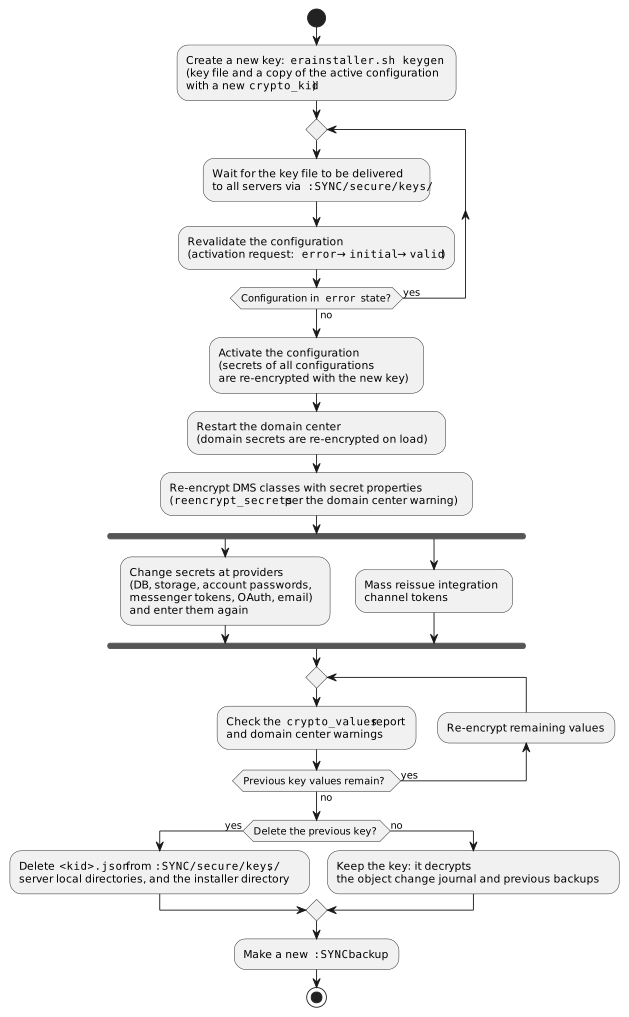
Create a new key:
erainstaller.sh keygen— a new file and a copy of the active configuration with a newcrypto_kid. The configuration is validated at creation, before the file is delivered to other servers: with several servers it gets theerrorstate (the error lists server nodes without the file; non-responding servers — warning,validstate). Wait for the file to be delivered to all servers and revalidate the configuration: an activation request moves it fromerrortoinitial, after validation —valid. Then activate the configuration: secrets of the activated and other saved configurations are re-encrypted with the new key. -
Restart the domain center: domain secrets are re-encrypted with the new key on load.
-
Re-encrypt DMS classes with secret properties (more) listed in the domain center warning.
-
Change the secrets themselves: re-encryption does not protect from someone who has the old key and old ciphertexts (DB, its backups, configuration files). DB, storage, provider account passwords, messenger bot tokens, OAuth provider
client_secret, email passwords — change at the providers and enter again; integration channel tokens — mass reissue (reissue). -
Check the crypto_values report: no previous key values remain. The report does not count the object change journal: previous key ciphertexts remain in it.
-
Whether to delete the previous key — administrator’s decision: deletion does not protect against a leak (leaked data has already leaked); without the file previous key values are not decrypted (object change journal, backups). Make a new
:SYNCbackup. Backups made before the change contain the old key together with old ciphertexts — store them under protection.
Rollback to the previous version
Versions before 1.13 do not decrypt secrets encrypted with the installation key (v5) in the DB and configurations: rollback is possible only with a DB backup made before the update.
Hot redundancy
Domain hot redundancy systems exchange keys manually: key files of each system are copied to :SYNC/secure/keys/ of the other (more). Configurations are not transferred between systems.