Overview
The application shelf is the user application of the Incoplax communication platform. The platform is multi-tenant (multi-domain) and distributed. To work with it you need to log in. Each user in their domain is assigned one or more roles that determine their privileges; the roles also determine which applications are available.
The application shelf is the entry point to the platform and the list of applications available to your account.
What it is
The platform has many applications: softphone, personal cabinet, reports, settings, contact center workstations. The shelf removes the need to remember their addresses — you log in once and launch what you need from a tile.
What appears on the shelf depends on your account permissions. An administrator usually has many applications, an ordinary employee a few.
Shelf
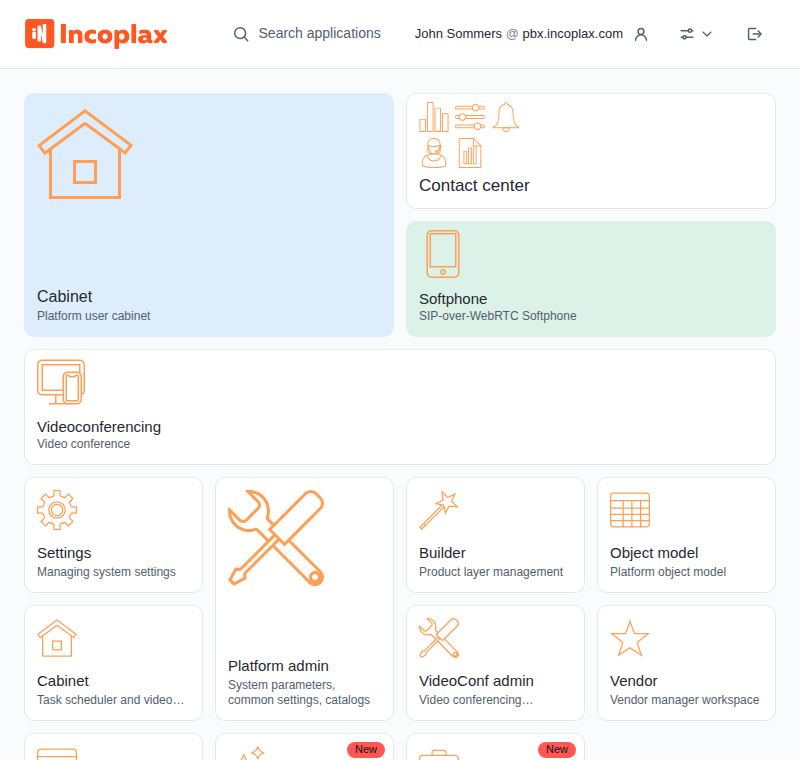
In the header from left to right: logo — return to the shelf, search, your name with domain, the View button, and logout.
Below are the tiles. An application has an icon, name, and description; a group has a name and icons of the applications inside.
Getting started
-
1. Sign-in — domain, login and password, sign-in via an external provider, what to do if sign-in fails.
-
2. Password, registration and invitation — forgotten password, self-registration, invitation registration.
-
3. Application shelf — tiles, groups, search, launch.
-
4. Shelf configuration — order, sizes, colors, groups and layouts.
-
5. Appearance, domain and logout — theme, connector, domain switch, logout.