Administrator bot
Overview
The administrator bot notifies connected master domain administrators about system state problems (/system/state) and accepts commands from them.
The bot is served by a system messenger account of the master domain (collection im/Accounts, the isSystem flag); it is serviced by the im microservice.
The bot logic is executed by the mware microservice, and settings are set by the master domain admin_imi_options parameter.
The bot works on the central site (where the master domain is) and only if the im microservice is present there: if the central site is unavailable, notifications are not sent.
The bot trusts the chat identifier as the administrator’s identity, so only messengers where the authenticity of incoming messages is verified are used:
-
Telegram — messages are fetched from Telegram by polling with the bot token;
-
MAX — in polling mode or webhook over https with a secret;
-
VK — with a configured
client_secret(Callback API).
Accounts without verification (WhatsApp, VK without client_secret, MAX webhook over http) are not used by the administrator bot: they cannot be selected in the administration application, and the service skips them with a warning in the log.
System accounts (isSystem) belong to the platform: product services do not use them, and the administrator bot does not use product ones.
Bot messages are not stored: incoming messages are deleted after processing, outgoing — after sending or a sending error.
A separate bot should be created for each platform instance. Registering one token in different platform instances is likely to cause problems.
How the bot works
-
Every
check_interval_secseconds the service gets the system state and decides what to send for each connected chat (see System state notifications). -
Messages from chats are commands. A command is executed if the chat is connected to a master domain administrator and the command is not older than
command_expire_sec; from an unconnected chat only/startand/pingare accepted. -
A chat is connected with a one-time code: the bot sends a code to the chat, and the administrator enters it in the administration application (see Connecting an administrator).
-
Each chat is configured separately: notification status, silent mode, excluded state sections, language.
Parameters and their allowed values are described in admin_imi_options.
Connecting the bot
General procedure:
-
Create a bot in the messenger and obtain its token (for Telegram — see Telegram).
-
In the master domain administration application open "System → Administrator bot → Bots" and add a bot: name, channel, token, and channel parameters. The bot is created by a system account.
-
Select the bot with the "Make administrator bot" action on the "Bots" tab or in the "Administrator bots" field on the "Parameters" tab. The bot is added to
im_accountsof theadmin_imi_optionsparameter; when the bot is deleted, it is excluded from it. -
Connect administrators (see Connecting an administrator).
Without the administration application:
POST /rest/v1/model/im/Accounts
{
  "name": "admin_bot",
  "channel": "telegram",
  "isSystem": true,
  "enabled": true,
  "options": {"token": "<token>", "proxyUrl": "", "parse_mode": "none"}
}
then add the account identifier to im_accounts of the admin_imi_options parameter.
Telegram
The service interacts with the Telegram Bot API by polling (long polling). Internet access to https://api.telegram.org is required from the central site servers where the im microservice runs, directly or via a proxy (see Proxy for Telegram).
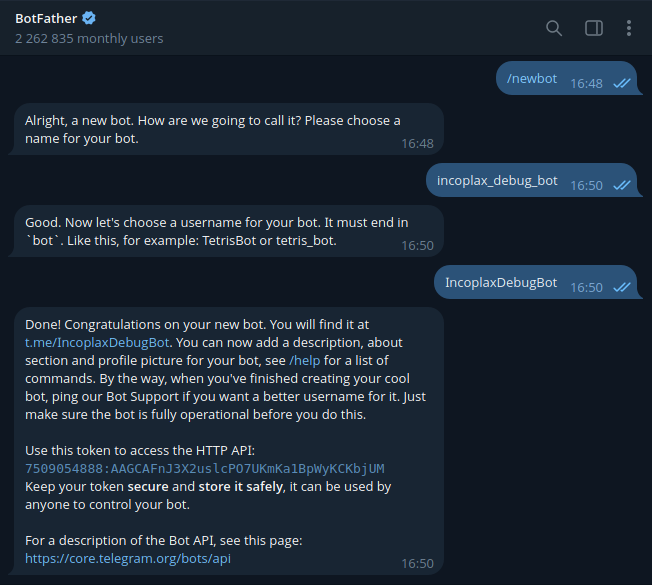
Step 1. Create a bot. Find @BotFather in Telegram and send it the /newbot command, set the bot name and username. @BotFather will issue the bot token.
Step 2. Configure the command menu. Optional step. Send @BotFather the /setcommands command, select the bot, and send the list:
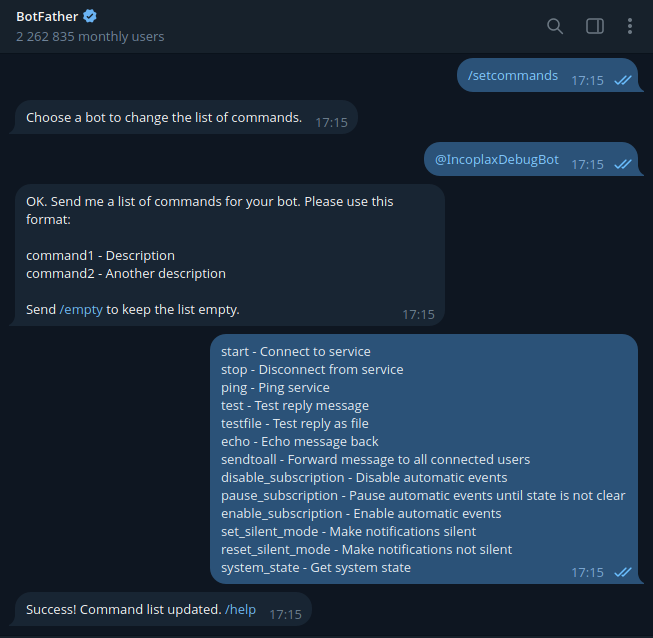
Current command list:
start - Connect chat
stop - Disconnect chat
ping - Ping service
test - Test reply message
testfile - Test reply as file
echo - Echo message back
sendtoall - Send message to all connected chats
disable_subscription - Disable notifications
pause_subscription - Pause notifications until system state is ok
enable_subscription - Enable notifications
set_silent_mode - Make notifications silent
reset_silent_mode - Make notifications not silent
system_state - Get system state
download_logs - Download logs of nodes
exclude_keys - Exclude sections of system state from notifications
include_keys - Include sections of system state back
excluded_keys - Show excluded sections
lang - Change language
For menu commands requiring parameters, the bot will ask for them in a separate message.
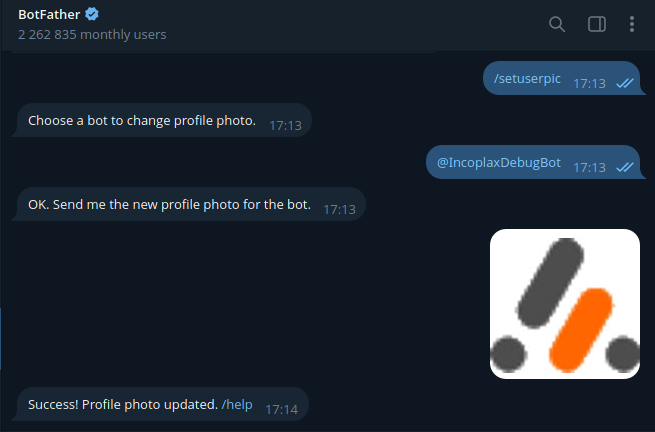
Step 3. Customize the bot. Optional step. Icon — the /setuserpic command, description — /setdescription, name — /setname.
Step 4. Add the bot to the system (see the general procedure above): channel telegram, token from step 1, proxyUrl if necessary. Recommended message formatting — none.
Within a short time the platform will connect to Telegram.
Step 5. Find the bot in Telegram by username and check: the /ping command — reply pong.
Step 6. Connect the chat with the /start command (see Connecting an administrator) and check with the /system_state command.
Proxy for Telegram
If the central site servers do not have access to https://api.telegram.org, requests are routed through a proxy with the proxyUrl account parameter:
-
an address like
https://proxy.example.org/— the requesthttps://api.telegram.org/bot<token>/getUpdatesis sent tohttps://proxy.example.org/api.telegram.org/bot<token>/getUpdates; likewise for files (https://api.telegram.org/file/bot…;); -
a modifier like
/reg/Pattern/Replacement— the address is changed by a regular expression according to the modifier rules.
Any other platform instance installed where Telegram is accessible can serve as the proxy. In its master domain an external routable host is created (collection ws/ExternalRoutedHosts) with a proxy route to api.telegram.org, for example:
{
  "host": "proxy.example.org",
  "enabled": true,
  "routes": [
    {"port_type": "https", "path": "/api.telegram.org/", "handler": "proxy_http", "host": "api.telegram.org", "port": 443, "tls": true}
  ]
}
After that "proxyUrl": "https://proxy.example.org/" is specified in the bot account.
The route forwards any requests to the Telegram Bot API, so the proxy host should not be published more widely than necessary.
MAX, VK
-
MAX — channel
max, bot token. In polling mode (default) there are no additional requirements; in webhook mode a public https address (webhookHost) and a secret are required. -
VK — channel
vk: community token,server_secretandclient_secretfrom the "Callback API" tab of the community settings.
More about parameters — im/Accounts.
Connecting an administrator
-
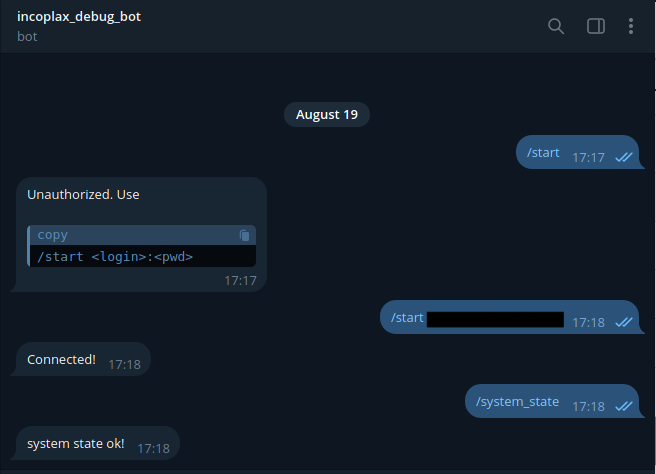
In the chat with the bot send the
/startcommand. The bot will send a 6-digit connection code; the code is valid for 10 minutes (counted from the last entry attempt). -
In the master domain administration application open "System → Administrator bot → Requests", select the chat request, and enter the code. Without the application:
PATCH /rest/v1/model/system/AdminImiRequests/<id> {"confirmCode": "<code>"}. -
The bot will send the chat the message "You are authorized as <name> (<login>)".
Only a master domain user with the admin role can confirm the code; the chat is connected to that user. After three incorrect codes the request is rejected, and /start must be sent again.
Connected chats — collection system/AdminImiSubscribers.
If the user ceases to be an administrator, notifications to their chat are disabled.
The administrator password is not passed to the messenger.
Commands
| Command | Action |
|---|---|
|
Connect chat (request a code). |
|
Disconnect chat. |
|
Check: reply as text or file. |
|
Return the text. |
|
Send the text to all connected chats. |
|
Pause notifications until the system state normalizes. The pause is removed automatically. |
|
Disable and enable notifications. |
|
Enable and disable silent notifications. |
|
Get the current system state as a file. |
|
Get a logs archive of the specified nodes (names comma-separated). |
|
Do not notify about system state sections, for example |
|
Return sections to notifications, |
|
Show excluded sections and sections of the last state. |
|
Change the chat message language, for example |
A command with parameters can be sent without them (selected from the messenger menu): the bot will ask for the parameters in the next message.
The wait lasts command_input_timeout_sec seconds; another command cancels it.
Command age is the time from sending the message in the messenger (message time according to the messenger) to its processing by the service. Commands older than command_expire_sec seconds are not executed and are deleted without a reply: this is how commands accumulated while the bot or service was unavailable are not executed.
The default chat message language is the master domain language (for the Incoplax product — English); for a connected chat it is changed by the /lang command or the lang field in "Administrators".
System state notifications
Every check_interval_sec seconds the bot checks the system state separately for each connected chat, excluding the sections excluded in that chat:
-
problems appeared or their composition changed (section, server, reason) — a file with the full system state and the list of changes;
-
only numeric indicators changed (memory, load, queues, etc.) — a file if the indicator moved to another level (percentages — tens, the rest — doubling), not more often than
numeric_change_interval_minminutes; -
problems persist unchanged — a text reminder once every
reminder_interval_minminutes (0 — do not remind); -
problems resolved — the message "System state is normal".
Every day at alive_report_times (minutes from 00:00 local server time, by default 8:00) the bot reports "Report: service is running". The absence of this message is a sign that intervention is needed.
After the service restarts the bot reports "Administrator notification service restarted".
Updating from previous versions
The previous Telegram bot is migrated automatically; administrators do not need to reconnect:
-
the token and
proxyUrlof thesystem_telegram_botparameter (or the token of thetelegram_bot_tokenparameter in versions before 1.10) — into the system messenger accountadmin_imi_telegramof theim/Accountscollection; it is added toadmin_imi_options.im_accounts; the previous parameter is deleted; -
connected administrators — into the system/AdminImiSubscribers collection with status and silent mode preserved.