Assets
Description
Assets are environment files of software libraries of the "Incoplax" system and other applications. They customize system behavior for the needs of the delivered product in various areas prepared in advance for such customization.
All assets are located in the system software directory (runtime). They get there at the product version distribution build stage:
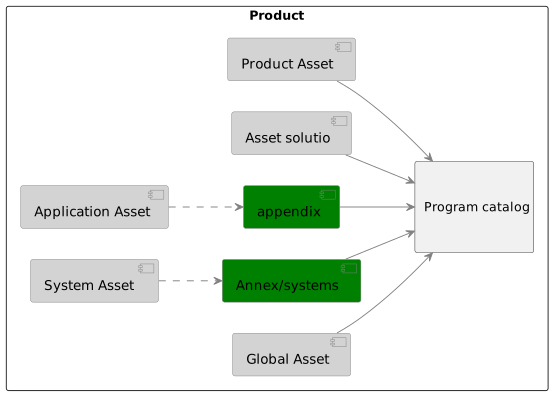
During the build process, some assets can be replaced by others, and they can also be replaced on an already deployed system. The order of asset inclusion during the build is shown in the diagram.

From the build process perspective, application assets are divided into the following types:
- Internal asset – stored in the application source code repository.
- External asset – stored in a separate repository.
Assets are moved to an external repository based on large volume, binary content, and regular full replacement.
Some assets assume project customization. For this reason they are located not in the software directory (or not only there), but also in the synchronization directory between servers. Thus, during update they are not replaced, and with configured backup they are preserved. Depending on their location, they are created/modified either by the host/container administrator or via the API.
Sections
-
System assets – common files used in any products based on the "Incoplax" system.
-
Product assets – files customizing the system wrapper when delivered as a specific product.
-
Domain assets – files customizing behavior and content of predefined domain types.