Hot domain redundancy
Purpose
A hot standby system instance automatically synchronizing domain settings and in passive standby for loss of connection with the leader instance. The primary instance is active, the standby instance is passive. All settings are synchronized, and statistics are synchronized too. Users and devices can connect to either of two or more instances. But only the instance currently active authorizes them, and either refuses or redirects to the active one.
Concept
Both instances have a domain with the same name. Settings of each define redundancy parameters specifying the alternative instance, access to it, and priority.
With correct settings and redundancy mode enabled, these domains on the two instances automatically reach Active-Passive state. On the instance where the domain is passive, microservices creating activity are deactivated, and facades stop servicing domain requests.
With correctly configured and enabled redundancy in the domain, the following roles are distinguished for a domain instance, and for the instance from this domain’s point of view:
-
Master is the domain with the highest priority (smallest order parameter value).
-
Slave is a domain with a priority other than the highest.
With correctly configured and enabled redundancy in the domain, the following states are distinguished for a domain instance, and for the instance from this domain’s point of view:
-
Active is a domain that has not detected higher-priority active alternatives and in which services operate fully without restrictions.
-
Passive is a domain that has detected a higher-priority active alternative and in which services deactivate activities.
A domain for which redundancy is not configured or is disabled is isolated and is not considered active, although it operates fully without restrictions. Disabling redundancy in the domain setting entails loss of activity. A domain with incorrectly configured redundancy is isolated.
At the same time, an instance may have several different domains with configured and enabled redundancy in different roles and states.
A passive domain does not generate activities: it does not execute scripts, does not launch product microservices, and does not synchronize with email directories and messengers. Only a user with the administrator role can connect to a passive domain; other users are redirected to the web servers of the active domain instance when trying to create a session. SIP device registration is also impossible, and requests are redirected to the SIP servers of the active domain instance.
At the same time the passive domain data model is available to administrators and system processes.
The passive domain regularly pings the active instance and activates when it is lost. It also synchronizes settings and the data model according to metadata in the redundancy settings. Synchronization is performed with some limitations — some settings related to the specific instance, as well as real-time collections, are not synchronized. Accordingly, on activation current activities are not continued or restored. Additionally, filtering of the collections themselves, entities in collections, and masking of collection fields whose data is subject to synchronization can be configured. Subscription to collection changes is supported, and data is synchronized in real time.
The active domain keeps a journal of its activity. It is used to download history in relation to passive and unavailable periods.
Thus user data and history are synchronized between master and slave. The slave is ready at any moment to activate and start servicing processes. When the master is restored, immediately or by administrator command, the domain states are swapped.
Configuration
To enable redundancy mode:
-
Make sure the two systems are the same product.
-
Make sure the standby system has a domain with the same name.
-
Make sure both system configurations have an identical general.pwd_hash_alg parameter value. If at least one system configuration has the general.crypto_kid parameter set, copy key files from
:SYNC/secure/keys/of each system to the same-named directory of the other. Secret properties of DMS classes (messenger and email accounts, OAuth providers) are synchronized as ciphertext: without the other system key file the write is rejected (422), and with differentcrypto_kidvalues entities are re-encrypted on every synchronization — set one key in both systems. -
Make sure the configuration has an identical alias composition (it is critical to have aliases used in storages of the redundant domain and aliases used by mixers to save recordings).
-
In each system allocate an identical number of licenses to the configured domain from the parent.
-
In each system create an integration channel bound to a user (for example "System", or another with finer permission settings); in these integration channel properties open access to API endpoints ('*' or finer). Make sure the integration channels open access to /rest/v1/iam/users.
-
Make sure server addresses are not in each other’s border filter rule blacklists.
-
Check mutual access from each system to the other and to itself by making a CURL request using the prepared tokens (for example,
curl -I -H "Authorization: Bearer 12345678123456781234567812345678" https://era.my-domain.org/rest/v1/iam/users?limit=1&mask=id— the call must return code 200). -
Additionally, if the standby system was configured previously, make sure there are no conflicts in existing entities:
-
users: identifiers, logins, and email addresses of users. If domains overlap, it must be eliminated and brought to one base. Also, domain user email addresses in both systems must not overlap with email addresses of other accounts of all other domains.
-
user groups: groups must not include users copied from the master domain, or these users must be manually copied to the master domain of the second system preserving identifiers.
-
integration channels: binding to user accounts (in particular the System account) must guarantee that these accounts are excluded from synchronization on both systems, for example set 'ext.survival_sync: false'.
-
-
Additionally, if the domain on the master system was created and configured on versions earlier than 1.9:
-
update in any way in the master domain the users copied to other domains (to the target domain).
-
-
Provider accounts should be treated specially. With strict bindings to specific system server IP addresses, such accounts should be excluded from synchronization (ext.survival_sync: false).
-
Phone devices and/or autoprovision templates should be provided with settings for alternative connections to SIP servers of the standby system.
-
In each system in the relevant domain subject to redundancy, configure the settings.survival_options option:
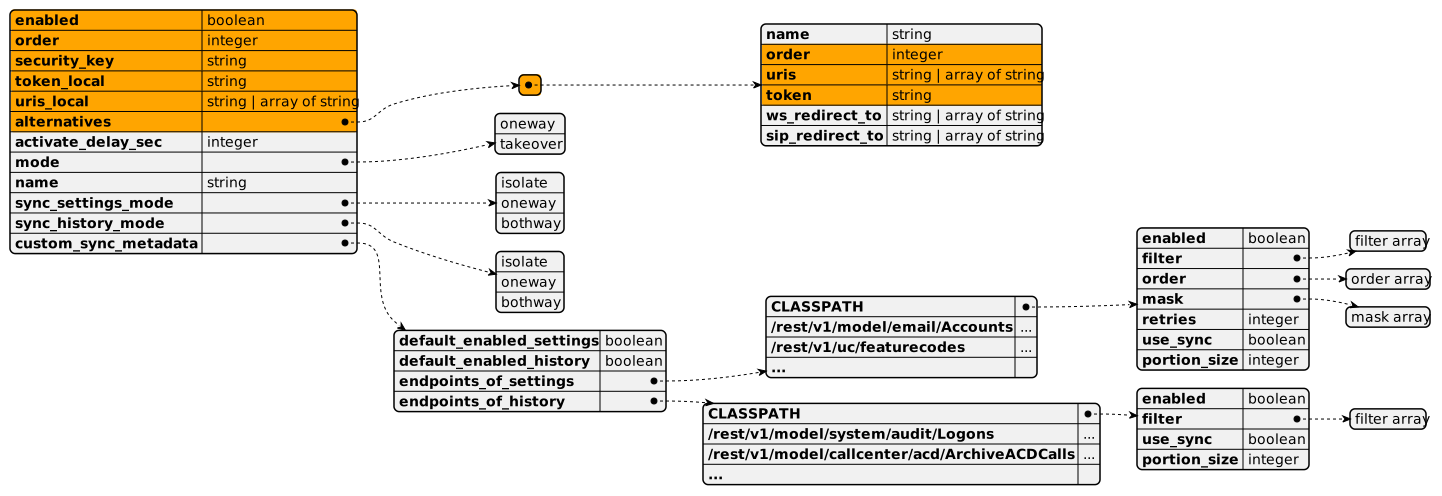
Fields required for correct service operation are highlighted in color.
-
enabled — must be enabled in settings of both instances. Possible values: true | false.
-
order — priority for determining master and slave. Must differ from the priority value in the domain setting on the other instance, and from priorities specified in the alternative instance list. It is recommended that values correspond, i.e., the priority specified in the alternative list matches the priority of the corresponding other instance, and vice versa. Value type: integer.
-
security_key — a verification string with an arbitrary key that must match in both instance settings. Not encrypted and returned as is. Value type: string.
-
token_local — integration channel token in the domain of the current system instance. Used when synchronizing attachment files. Value type: string. The value is the clear token obtained on channel creation or reissue (the token is not issued when reading the channel). Encrypted on save and not returned clear. Channels with
ext.survival_sync = trueare synchronized encrypted: pair instances must have a common installation key bundle. -
uris_local — web server URL or a list of URLs of several web servers of the current system instance. Used when synchronizing attachment files. Examples: "https://instance1.incoplax.com:443", "http://192.168.100.1".
-
alternatives — a list of one or more objects describing alternative systems in the redundancy and synchronization group of this domain.
-
name — optional field used only for logging mentions of the described alternative instance. Value type: string.
-
order — priority for determining master and slave. Must consistently correspond to the order value of the root setting object in the corresponding alternative system instance. Value type: integer.
-
uris — web server URL or a list of URLs of several web servers of the alternative system instance. Used for http and websocket connection to the alternative instance web server to determine availability and synchronize data. Examples: "https://instance2.incoplax.com:443", "http://192.168.100.22". Possible value types: string, array of string.
-
token — integration channel token in the domain of the alternative system instance. Used to authorize http and websocket connections to the alternative instance web server. The token must have an assigned user with the admin role for full access to settings. Encrypted on save and not returned clear. This token channel must allow websocket capabilities
restandsubscribe: opts.filter_capabilities =["rest","subscribe"]or["*"](by default the list is empty — capabilities are prohibited, synchronization and subscription do not work). Value type: string. -
ws_redirect_to — optional field. When filled with correct access URLs to the alternative instance, during the passive state all HTTP authorization requests from users without the admin role are redirected to these addresses of the active alternative instance. Examples: "https://instance2.incoplax.com:443", "http://192.168.100.22". Possible value types: string, array of string.
-
sg_redirect_to — optional field. When filled with correct access URIs to the alternative instance, during the passive state all SIP requests are redirected to these addresses of the active alternative instance. Examples: "sip:instance2.incoplax.com:5060", "192.168.100.22:5060", "192.168.100.23". Possible value types: string, array of string.
-
-
activate_delay_sec — optional field allowing override of the default. Pause before activating the passive instance after detecting loss of the active alternative instance. During the wait, attempts are made to contact the active instance, and if it is found the timer stops. Default 30 seconds. Decreasing the interval makes sense to increase availability, but with the risk of brief simultaneous active operation of both instances. Increasing the interval makes sense to reduce false positives on unstable channels and to account for update and restart operations. Value type: integer.
-
mode — master behavior mode at start when an active slave exists — wait for slave deactivation or take over activity with priority. Possible values: takeover | oneway. Default takeover.
-
name — optional field, not used by the service.
-
sync_settings_mode — settings synchronization mode. Possible values: isolate — do not synchronize settings; oneway — synchronize settings only toward the passive slave; bothway — synchronize settings toward the passive slave and the passive master. Default oneway.
-
sync_history_mode — history synchronization mode. Possible values: isolate — do not download history from the other instance; oneway — download history only from the slave to the master at master activation without further subscription to changes; bothway — additionally the slave subscribes to changes of the active master history. Default isolate.
-
custom_sync_metadata — optional field for fine-tuning settings and history synchronization modes for specific collections. By default all existing collections are synchronized with partial filtering by some entity field values, and domain center collections related to individual access settings are selectively excluded from synchronization. Individual collections can be customized.
-
default_enabled_settings — the enabled field value for all collections by default (with default sync_settings_mode oneway).
-
default_enabled_history — the enabled field value by default (with default sync_history_mode isolate).
-
endpoints_of_settings — object for fine-tuning synchronization of settings collections (domain center collections and data model collections of type 'category'). Each object key is the REST endpoint of a specific collection, and the value is the fine-tuning object for synchronizing this collection. Keys/REST endpoints not matching the specified collection types are ignored.
-
enabled — collection synchronization handler switch. Possible values: true | false.
-
filter — additional filter on collection objects; the standard format of the collection read REST request filter parameter is used. The system always applies filters to domain center collections on the fields ext.source, ext.survival_sync, and for the domain/settings collection on the key field. Additional filters can only strengthen them. Value type: array.
-
order — entity sorting when reading data; the standard format of the collection read REST request order parameter is used. By default sorting by identifier is applied, and in some domain center collections by ext.ct. This is important for the correct order of object creation. Value type: array of object.
-
mask — restriction on the collection field composition; the standard format of the collection read REST request mask parameter is used. Value type: array of string.
-
retries — number of iterations when synchronizing the collection on errors. For example it can be used as an alternative to order when working with an inherited class collection. Value type: integer.
-
portion_size — non-standard portion size when reading data. Default 1000, but 100 for scripts. It makes sense to rely on the average entity size. Value type: integer.
-
-
endpoints_of_history — object for fine-tuning synchronization of history collections (data model collections of types 'history' and 'transactionlog'). Each object key is the REST endpoint of a specific collection, and the value is the fine-tuning object for synchronizing this collection. Keys/REST endpoints not matching the specified collection types are ignored.
-
enabled — collection synchronization handler switch. Possible values: true | false.
-
filter — additional filter on collection objects; the standard format of the collection read REST request filter parameter is used. Value type: array.
-
use_sync — synchronization operation switch; does not affect changes by notifications based on subscription. Can be used for transactionlog collections in KAFKA without Clickhouse, i.e., where data reading is impossible but subscription to the event stream may make sense. Possible values: true | false.
-
portion_size — portion size when reading data. Default 1000, but 100 for scripts. It makes sense to rely on the average entity size. Value type: integer.
-
-
To exclude specific domain center collection objects from synchronization (or, conversely, include them for some such collections), you can control the ext.survival_sync value of each specific entity.
Automatically created objects, including by the product layer, are not synchronized. This is done via a filter on the ext.source field (values "master", "fixture", "productLayer" are excluded).
Debugging
The redundancy management process is serviced by the mware microservice. Two types of services are used within servicing:
-
survival— applies options, tracks the state of alternative instances, and manages the local instance state. -
etl— organizes the data synchronization process — streaming read/insert, subscription, and update based on notifications.
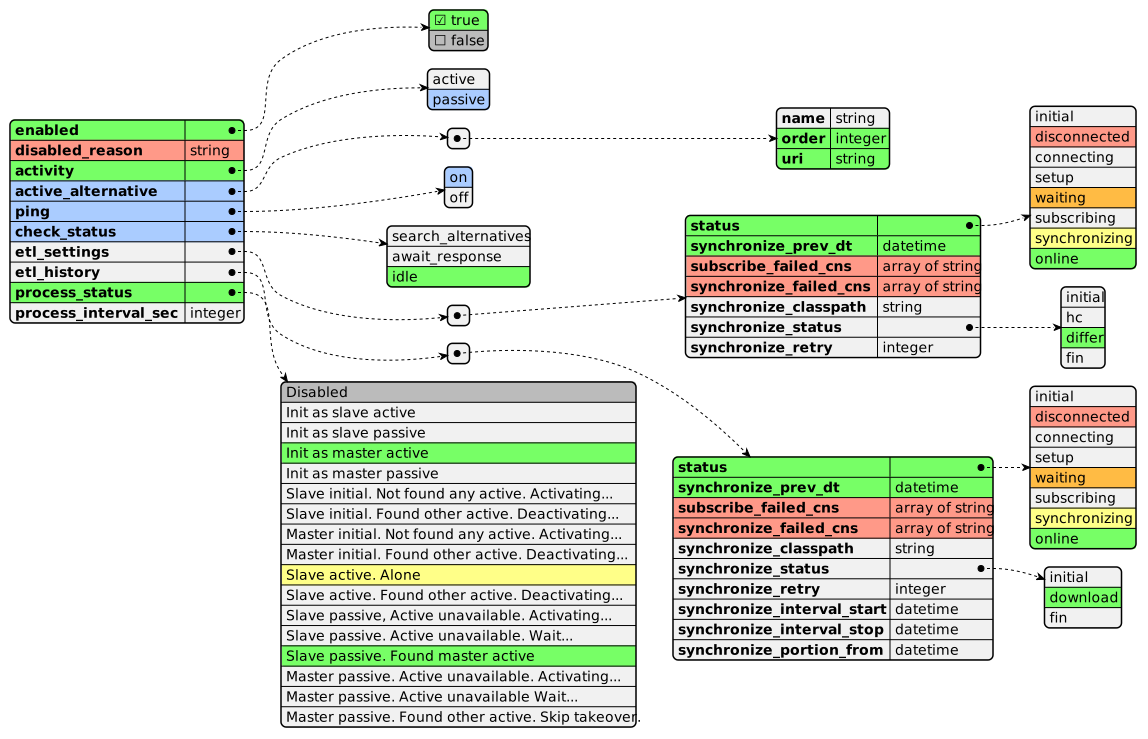
In the domain collection /rest/v1/model/platform/monitoring/Services an object with the current service state is available (fields service="survival", id="62a75cca-0196-5dbf-2cd9-7cd30a921f58"). The following state data composition is provided (data field):
-
enabled — whether the domain redundancy service is enabled on this system instance.
-
disabled_reason — reason for forced service disabling if the service is enabled by settings.
-
activity — whether the domain is active or passive on this system instance.
-
active_alternative — for passive instances displays information about the current active alternative, fields: 'name', 'order', 'uri'.
-
ping — whether periodic service state checking on alternative system instances is performed.
-
check_status — current state of the alternative state check operation. May be useful if the alternative check takes a long time.
-
process_status — human-readable text message about service state on this system instance.
-
process_interval_sec — if the domain is passive and the service is waiting for restoration of connection with the active instance or restoration of the active instance itself within the configured time, displays the time interval elapsed since the wait started. After the full configured wait time with priority adjustment the service will be activated.
-
etl_settings — object with information about the settings and categories synchronization process state.
-
status — current synchronization process state
-
synchronize_prev_dt — date/time of completion of the last settings and categories synchronization iteration.
-
subscribe_failed_cns — list of collections (endpoints) whose change subscription failed during the last synchronization iteration. Notifications and real-time data updates will not arrive for these collections during the next period.
-
synchronize_failed_cns — list of collections (endpoints) whose synchronization failed during the last iteration. In these collections the data composition may differ from the active instance.
-
synchronize_classpath — during the synchronization process displays the currently processed endpoint, for example "/rest/v1/iam/users" or "/rest/v1/model/callcenter/outbound/SimpleContragents".
-
synchronize_status — current state of the synchronization process for the specific collection being serviced: 'initial', 'hc', 'differ', 'fin'
-
synchronize_retry — on retry displays the iteration number
-
-
etl_history — object with information about the history and transaction log synchronization process state.
-
status — current synchronization process state
-
synchronize_prev_dt — date/time of completion of the last historical collection synchronization iteration.
-
subscribe_failed_cns — list of collections (endpoints) whose change subscription failed during the last synchronization iteration. Notifications and real-time data updates will not arrive for these collections during the next period.
-
synchronize_failed_cns — list of collections (endpoints) whose synchronization failed during the last iteration. In these collections the data composition may differ from the active instance.
-
synchronize_classpath — during the synchronization process displays the path to the currently processed historical collection, for example "/rest/v1/model/callcenter/seances/ArchiveSeances".
-
synchronize_status — current state of the synchronization process for the specific collection being serviced: 'initial', 'download', 'fin'
-
synchronize_retry — on retry displays the iteration number
-
synchronize_interval_start — date/time of the start of the synchronized historical data interval for the specific historical collection being serviced.
-
synchronize_interval_stop — date/time of the end of the synchronized historical data interval for the specific historical collection being serviced.
-
synchronize_portion_from — date/time of the start of the synchronized data portion for the specific historical collection being serviced. Servicing a portion includes downloading data and attachments from the active system instance and uploading data and attachments to the local system instance.
-
By enabling TRACE or DEBUG logging level for the active mware node, the entire monitoring and synchronization process goes to the node log middleware/erl_*.log.
Collection synchronization is performed sequentially in one process/thread, and the process can be traced thoroughly. Settings and history are synchronized in separate processes. The passive instance synchronizes only settings, while historical collections are inserted only based on subscription and notifications.
On the passive instance the domain is not serviced in the following microservices:
-
email — the domain service is fully unloaded, no requests to mail servers occur.
-
im — the domain service is fully unloaded, no requests to messenger servers occur, and hooks are not processed.
-
msvc — the domain service is fully unloaded, product microservices stop.
-
mware — domain services initiating activities stop: provider distribution, scheduled script launch, servicing of trunk accounts without registration, callmanager, devicemanager.
-
sg — blocks certain initial REGISTER, INVITE, SUBSCRIBE, PUBLISH requests. With the sg_redirect_to setting it responds with a redirect to the active instance addresses.
-
esg — does not service calls from uplinks by domain accounts, treats them as "unknown" and acts according to settings. Either a refusal response or ignoring.
-
b2b — does not route to the domain using cross-domain rules. Initiating calls to the domain do not arrive from facade services.
-
ivr — initiating calls to the domain arrive from neither b2b nor callmanager.
-
conf — initiating calls to the domain do not arrive from b2b.
-
svc — there is no one to launch service scripts in the domain in the remaining active part of the system.