Incoplax two-server configuration: pros, cons, and real fault tolerance
- The illusion of simplicity
- Why choose a two-server configuration?
- Criteria for one server being sufficient
- Reliability mathematics
- Failover switching in Active-Active architecture
- Fate of active conversations during failover switching
- Network problem and timeouts
- Server decommissioning mode (Deservice)
- SIP phones and softphones
- Client applications
- Providers and external PBXs
- IVR and media
- Databases
- File system specifics
- Integrations
- Split-brain (island separation)
- Pros and cons of the two-server configuration
- Ideal HA contour
- Alternative approach: Active-Passive with geo-distribution
The illusion of simplicity
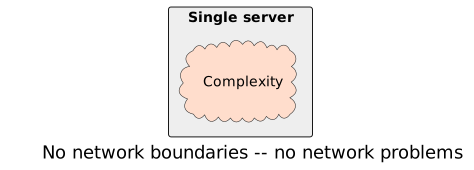
When the system runs on one server, we do not think about internal processes. We are not concerned about coupling between components, data flows, or channel load. Inside one node there are no obvious network delays, no time synchronization problems, no standby connection points. The very notion of an "integrity point" does not arise while we stay within the boundaries of the single. We do not need to care about split-brain, quorum, or data recovery mechanisms.
This is a great blessing of single-server architecture. But this blessing disappears as soon as the system goes beyond one node.
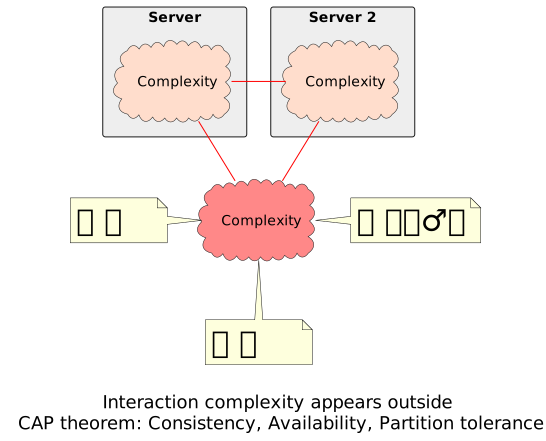
In this article we will look at the specifics of a two-server configuration. This is the first step beyond a single server. But already at this step we face the full range of consequences of choosing the path to a multi-server configuration.
Obviously, additional servers allow distributing load. However, we will leave the scaling aspect aside — it is less interesting in the context of risks. We are interested in redundancy. This aspect hides a huge layer of details invisible at a superficial glance but directly affecting the result.
Mainly we will focus on the Active-Active configuration — two servers within one system instance.
Why choose a two-server configuration?
A two-server configuration is usually chosen for fault tolerance. But why? The request for fault tolerance is the result of working through project risks. An obvious risk is the failure of one server.
However, fault tolerance does not necessarily mean several servers. If a server is of the High Availability category (hardware-reliable), the risk of its physical failure is often covered at a lower level. In such cases the benefit of a two-server configuration may not outweigh the effort and complications it entails.
|
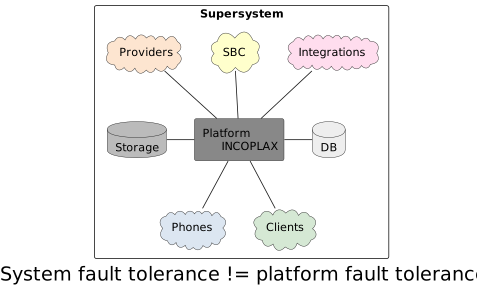
It is important to understand: platform fault tolerance does not directly entail fault tolerance of the whole system. The Incoplax platform is only a subsystem. The overall system includes phones, softphones, client applications, communication providers, databases, brokers, file storages, and integrated systems. All of them are separated by the network and have their own addresses and connection mechanisms. Fault tolerance requirements apply to the large supersystem as a whole, not only to the platform. |
Criteria for one server being sufficient
Before moving to complications, let us honestly answer the question: when is one server enough? The Incoplax platform allows building a fault-tolerant scheme, but it is not a "magic pill". If the surrounding infrastructure is not ready, the second server will only complicate life.
A single-server configuration is justified if:
-
Availability requirements are below 99%. The business can afford communication interruptions during hardware recovery.
-
A hardware-reliable server is used. A High Availability server itself (redundant power supplies, RAID arrays, ECC memory) already covers a significant part of hardware failure risks. Even more so for virtual computing resources.
-
Interruption of current conversations is not critical. Loss of current conversations at the moment of server failure is no more critical than a forced service interruption.
-
Limited budget. There are no resources to support double infrastructure.
-
Infrastructure has single points of failure (SPOF). If servers are powered from one UPS, connect to the network through one switch, and other obvious points of failure exist — the second server will not save from infrastructure failure.
-
Infrastructure lacks dedicated HA services — file storages, databases.
-
No round-the-clock support. There is no 24/7 admin who can respond to incidents that do occur in complex schemes.
-
No risk assessment has been performed. There is no business risk map to study dependencies and justify redundancy costs.
|
If these points apply — do not complicate. A reliable single server is definitely better than a poorly configured cluster. At the very least it is worth once more carefully weighing whether the move to a multi-server system is truly justified by approved requirements and whether the risks are actually eliminated. |
Reliability mathematics
Suppose we added a second server. Consider the reliability calculation model. Let the reliability of one server be R. In a system of two independent parallel servers the system functions as long as at least one node works. The reliability of such a system is calculated by the formula:
R_sys = 1 - (1 - R)² (0.9999 vs 0.99)If server reliability is 0.99, then the reliability of a two-server system rises to 0.9999. However, the probability that at least one server fails increases, since there are more components:
P_failure = 1 - R² (0.0199 vs 0.01)|
Conclusion: Adding a server increases overall system availability but increases the frequency of component failure events that must be monitored and serviced. |
Failover switching in Active-Active architecture
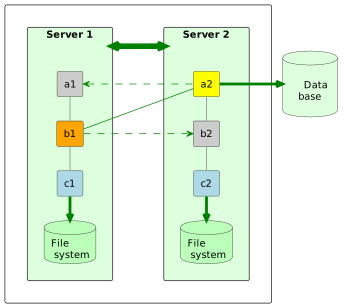
So, the second server is added. For full operation the role composition on the servers must be identical and fully functional. Microservices are distributed, pairs and groups appear, leaders are determined in pairs with integrity points. Mass processes (call servicing) are statistically distributed across both nodes. Some active microservices on the first server, some active on the second. With proper configuration both nodes are loaded evenly.
Suddenly a risk triggers — one server is lost.
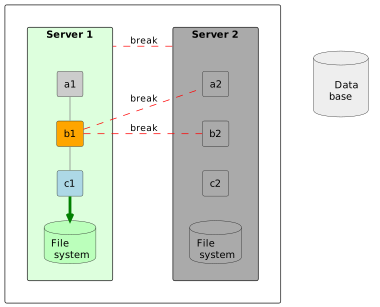
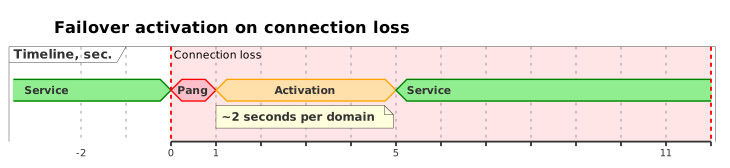
Microservice groups responsible for the integrity point have one active instance each (roughly, since there are mechanisms for fine-tuning integrity point separation by domains, classes, and other criteria). Loss of access to them leads to loss of availability. The Incoplax platform detects this almost immediately (2 seconds). Availability is a second-priority quality attribute, the main architecture driver along with scalability.
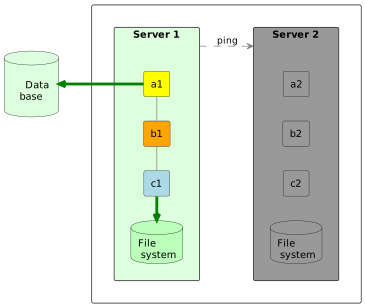
Rapid failover activation of standby instances occurs. The two-server distribution of active microservices becomes single-server. After a short time (5-10 seconds) a new incoming request will be processed. The administrator will not need to participate in urgent manual service recovery.
Fate of active conversations during failover switching
But let us ask an important question that concerns a manager:
-- What happens to those conversations already in progress at the moment of failure?
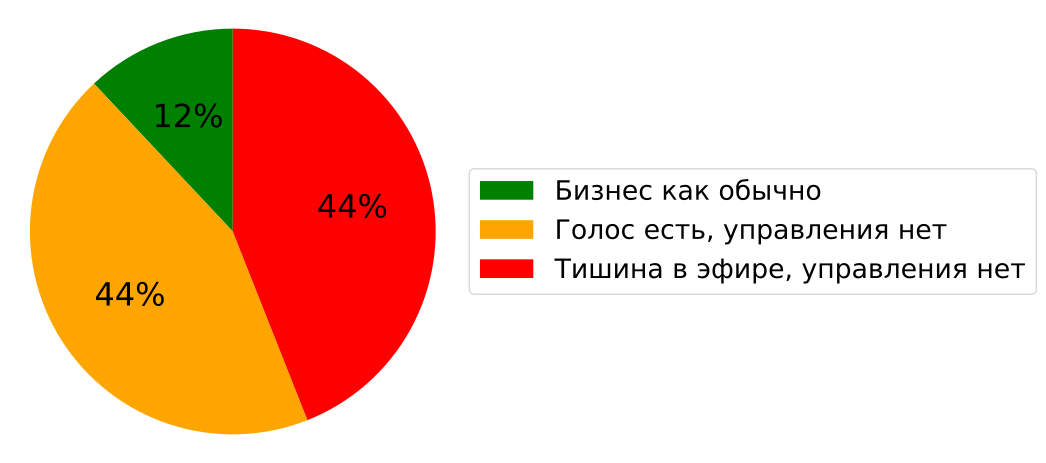
Here we have to take off the rose-colored glasses. Miracles do not happen: partial coupling of sessions on node failure is inevitable. Scenarios will differ:
-
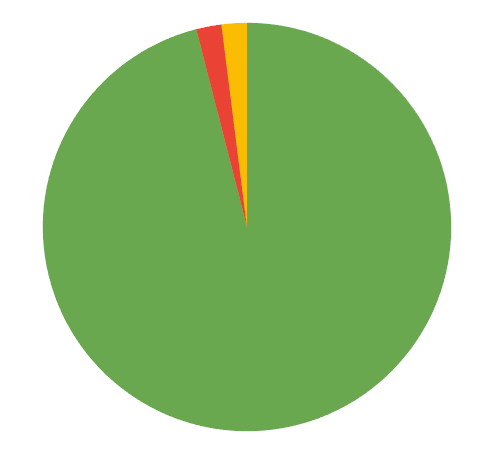
Only some subscribers will be lucky to remain in the full service volume without any changes. On average 12%.
-
Another part of subscribers will keep voice but without signaling control: you cannot put the call on hold or transfer it. On average 44%.
-
The remaining part will be in silence and without control: such conversations should be considered lost at this stage. On average also about 44%.
Why does this happen? In a two-server configuration microservices are distributed roughly 50/50. About half of current conversations will indeed not break at the moment. These are cases where the media gateway processing the voice stream remained on the live server, or all signaling services remained on the live server, managing to localize media processing if necessary.
However for the other half the situation is more complex. For a conversation to survive fully, all microservices servicing the specific call (facades, logic, media) must simultaneously be on the remaining node. The probability of such a coincidence in a dynamic environment is small — only about 12%. Therefore 44% of conversations will be without media and with a broken signaling chain. They can be considered lost at this stage.
Conversation recovery service
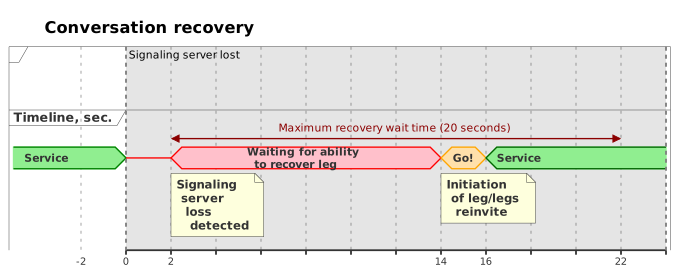
Is there a solution? Yes. The Incoplax platform has a special Conversation recovery service.
How does it work? When a server is lost, the system adapts the failover configuration, picks up or waits for the necessary registrations, and initiates recovery of legs of calls affected by the loss.
Up to 20 seconds are allocated for this whole chain. The service is able to recover all conversations almost surely (a probability theory term), returning both voice and control to subscribers. Almost — because some individual conversations may still break if hold or transfer is attempted in the interval. By the way, only such a mechanism can recover a call into an IVR script if the IVR microservice remained on the unavailable server.

And here we see a clear manifestation of the architectural limit of the two-server scheme. If we compare it with a configuration of 4 or more servers where roles are strictly separated (separate nodes only for media, separate ones for signaling), the picture changes radically. In such an architecture, even without a complex conversation recovery service, loss of one server does not lead to voice interruption. In the worst scenario (one of the signaling servers is lost, probability no more than 50%) only half of calls will keep voice without control; the other cases and conversations — with control preserved.
|
The conclusion is simple: two servers give excellent fault tolerance for new calls and fast system reaction, but for seamless preservation of current conversations either a conversation recovery service or a transition to multi-server architecture with role separation is required. |
Network problem and timeouts
But sometimes it is not the server that is lost but the network to it or between them. TCP connections can "hang" up to 60 seconds if the remote node stopped responding but did not close the connection. Failover will not occur until the connection breaks.
For prompt activation the system sends heartbeats (liveness signals) internally. Absence of a heartbeat entails forced TCP connection break. Here we enter the decision zone. It is unclear to the server: will the network recover in a second or is it lost forever?
There are two types of errors:
-
Type 1 error (False alarm): Not waiting for channel recovery when it will recover in a few seconds.
Consequences: Multiple activity migration, partial restarts, high CPU utilization, split-brain risk. Some real-time processes break, hitting the lost server and broken connection with requests.
-
Type 2 error (Missed failure): Waiting for recovery for a long time when the channel is actually lost.
Consequences: System fading for the timeout duration (up to 60 seconds TIME_WAIT). Some current processes break by timeout (in SIP — 32 sec, in data — 5 to 60 sec).
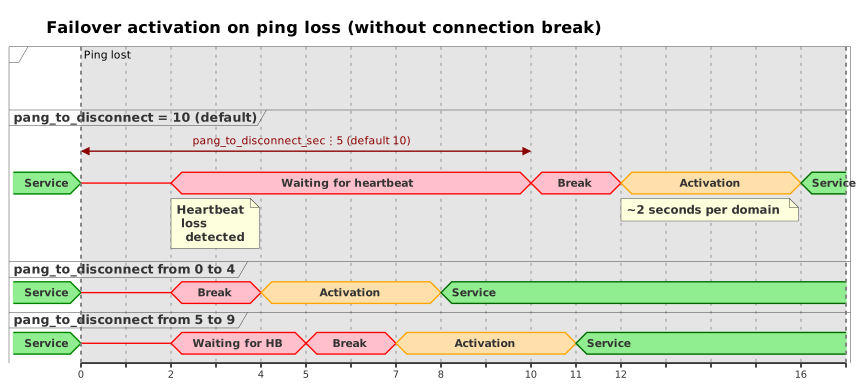
The strategy choice should be based on network failure statistics:
-
If the network sometimes "blinks" for 3-10 seconds and recovers without a break — it is better to accept a Type 2 error (wait 10-15 seconds) to avoid unnecessary migration.
-
If network loss is indistinguishable from server failure (always more than a minute) — it is worth accepting a Type 1 error (react quickly).
This is controlled by the wait interval configuration option (pang_to_disconnect_sec). Default — 10 seconds. The ideal way to avoid both error types is to eliminate fading networks at the infrastructure level (for example, connecting servers to one fault-tolerant switch). Then connections can be broken immediately by setting the option to 0. If not — a justified choice and its consequences must be accepted.
Obviously, the longer the wait here, the lower the chance of recovering affected conversations within the allocated 20 seconds.
Server decommissioning mode (Deservice)
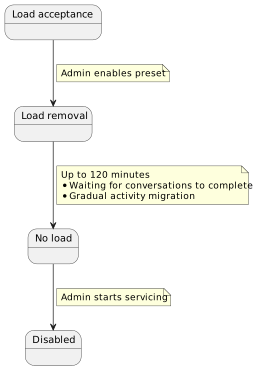
Incoplax has tools for smooth server decommissioning. The master domain administrator switches prepared server activity presets. If a server is deactivated in the preset, it is not switched off instantly but stops accepting new work over a couple of hours. Microservices stop participating in elections but finish servicing current contexts. Active instances gradually transfer load to the remaining server one by one. Facade microservices refuse or redirect incoming connections.
After two hours (maximum telephone conversation time) the server can be safely switched off. This is one of the bonuses of a multi-server configuration.
The roadmap for early 2026 includes development of call center functionality. At this moment migration of some call center microservices may lead to loss of tracking of current calls. We are working on this, especially considering that the call center product layer relies on invocations in a distributed DB and does not depend on service restarts.
SIP phones and softphones
If the device is connected to the live server, loss of the second node is unnoticeable to it. If the device was connected through the failed server, it must reconnect. Simply adding a second server does not provide this by itself.
Solution options:
-
Standby outbound proxy. Alternative connection points are specified in the device settings.
-
WebSocket: The device feels the loss and tries the alternative node (this is how the web softphone works). The address list is set in the softphone itself or in the platform administrator application if the softphone starts automatically.
-
UDP: The device will try to send a request to the live address at the next re-registration. The interval must be short enough (for example, 180 sec), or the server must send a NOTIFY with a re-registration command, which can be enabled in the configuration (SG reregister parameter), but is far from supported by all devices.
-
TCP: Works in this part similarly to UDP, but in most cases depends on connection hanging. Phones simply wait for the timeout before trying to reconnect.
-
-
Simultaneous Registration (RFC-5626). Parallel registration to several nodes (for example, Avaya phones). The server can call the device via the standby route immediately.
-
Virtual IP. A virtual address in the device subnet bound to additional SG instances on both servers. Only the instance on whose server the VIP is detected is active. Automation controls address activation using shell scripts adapted in the project. The phone always sees one address. If SG listens only on the VIP (not on the main local address), re-registration is not required, since all paths to the device remain valid.
-
Two accounts. A second account with forwarding when there is no registration. The phone is registered twice — under different accounts. Mostly the first registered account is used. Cons of this approach:
-
double utilization of account licenses
-
if the server is lost, recovery of the active conversation is impossible
-
|
Conclusion: For full device redundancy it is not enough to simply add a second server. Configuration adapted to the capabilities of connected devices is needed. Configuration of the server, the device, or both. |
Client applications
We consider two cases:
-
At the moment of user connection one of the servers is already unavailable.
-
Some users are connected to the web server on a suddenly unavailable server.
It is ideal if users need no additional actions so that usual actions in any conditions lead to the target result.
What options are there:
-
Virtual IP. The user application loses access and restores it without changing the address. These are additional web servers.
-
Assignment is managed externally. Responsibility for speed lies with an external controller (keepalived, pacemaker).
-
Assignment is managed internally. With two servers, fine quorum configuration is required to decide on VIP assignment.
-
-
External balancer. It is important that it be HA, otherwise it is a SPOF. Justified if clients cannot work with an address list or the internal structure must be hidden. If clients can work with several addresses, it is more reliable and simpler.
-
User chooses manually. Enters both connection points into the browser link bar. Switches manually when unavailable. The option is far from ideal — additional actions are obvious.
-
connector.html script. It is a partial automation of the previous option. It makes trial connections to all servers and redirects to a guaranteed live server. Transparent to the user.
-
Multiple DNS name. Can be part of the solution. For example, DNS can be updated based on server health-check monitoring (TTL is expected to be short). Or relying on round-robin and several F5 attempts or automated websocket connection.
If the client application has connected once, then with proper configuration it reconnects to the live server automatically when connection with the current server is lost. (Currently relying on virtual ip or multi DNS with a full client application reload.)
|
Conclusion: For full redundancy of user connections it is not enough to simply add a second server. An appropriate switching scenario must be worked out for the specific project. |
Providers and external PBXs
Loss of a server must not lead to loss of connection with PSTN. Without this, full availability obviously cannot be ensured. Options for organizing a standby scheme:
-
Registration. With proper settings provider accounts promptly register from another ESG instance on the remaining available server. This is the default option.
-
Simultaneous Registration (RFC-5626). If the external system supports it, the external system facade can also be reserved through different edge proxies. There will also be no interruption in routing to such a provider account.
-
Providers without registration. Default behavior is the same as for providers with registration — servicing responsibility migrates to the available server. Or the account can be serviced simultaneously on several ESG instances, which requires configuration. In any case the external system must be able to distribute calls across available Incoplax nodes. If one node does not respond, send to another. That is, this requires external node configuration.
-
Virtual IP. If the external system does not support several addresses for a P2P account (without registration), we use VIP on ESG instances. The instance on whose server the VIP is detected is active.
-
Alternative accounts. For outgoing calls it works via routing rules: if one account is unavailable, the call goes to the next routing rule matching by priority and filters, pointing to an alternative provider account (serviced on another server).
|
Conclusion: The capabilities of external systems must be carefully assessed, and suitable redundancy options selected and configured for each external node. If our system has many domains, it makes sense to prepare the configuration and master domain for various possible account setting variants. |
IVR and media
In versions from two years ago, loss of a server with IVR or the media gateway servicing its media session led to call loss.
-
Now loss of a server with the media gateway leads to creation of a new media session on an available node and automatic restart of the current script component (media component).
-
Loss of a server with IVR (with conversation recovery mode enabled) starts the script from the last save point.
|
Conclusion: Preserving IVR sessions generally requires enabling the conversation recovery service and deep rework of IVR scripts accounting for the possibility of interruption at any component of any script. |
Databases
The system stores the domain tree and accounts in PostgreSQL. Archives may be here too (including in another PostgreSQL instance) or moved to ClickHouse. The DB server must also be reserved, otherwise it is a mockery of fault tolerance.
When configuring Incoplax, connection strings are set. Incoplax chooses connection to the master. If the master is absent at the moment but there is a read-only recovery, loading may proceed from the recovery instance to reduce unavailability time.
|
We are deeply convinced: a real-time communication system in redundancy schemes should be kept separate from the DB. This is separation of responsibility and independent administration. |
One connection string if the facade balancer is HA. Or several connection strings if otherwise. Up to the point that different connection string sets can be specified for different servers.
Option "DB inside the contour"
A default installation is often encountered: DB next to the platform, on the same pair of servers (streaming replication). If there are no external tools, the built-in replication controller (middleware microservice) is used.
-
Task: monitor connections and, on master loss (after 30 sec), activate recovery.
-
Risk: When connectivity resumes, split-brain occurs (two masters). The controller makes a new replica from the former master from scratch. This may last hours. During this time the system has no current replica.
-
Therefore the controller stalls before switching. It is better to wait a minute than remain without replication for hours.
The built-in controller does not replace professional tools (Patroni, etc.). It covers cases in a minimally sufficient way. Its behavior can only be controlled by a conditional On-Off toggle.
Recommendation: In projects with serious requirements, move the DB out of the communication subsystem contour.
Broker for historical type collections
A broker can be used for guaranteed preservation of archival data. This applies when archives are also stored in PostgreSQL. Since version 1.10 it became possible to switch historical type collections with PostgreSQL storage to broker operation (Mnesia or KAFKA are used).
If the system is configured to work with ClickHouse, the KAFKA broker is used a priori. However it should be remembered that despite the distributed architecture of both ClickHouse and KAFKA, the two-server option is not complete because it does not provide quorum on server loss and is therefore subject to split-brain. Thus a two-server platform configuration should not be accompanied by deploying KAFKA and CLICKHOUSE on the same two servers.
|
DB summary: For a complete scheme the DB should be reserved. Ideally the DB exists and is administered by infrastructure separately as an isolated subsystem. |
File system specifics
In multi-server mode the platform works with file systems of several hosts. A file created on the first host may be needed by a script on the second. In single-server mode this is not critical; in two-server mode it requires a solution.
Those who configured file work in scripts have probably noticed that file addressing is not absolute but uses macro paths addressing various partitions and folders. Relative paths are the same for all servers, while absolute paths may differ on different servers according to configuration. This is not a recommended pattern, but a possible option.
Storage partitions:
-
Private partition. Executable files, logs, temporary files. Independent for each server.
-
SYNC directory. Automatic real-time synchronization by platform means (media files, scripts, certificates). Written by one random server. This is storage for a limited number of files/directories (within 100 thousand). This directory is extensively used by the system itself; the administrator will not have to configure it. It is only important to ensure it is not cluttered with project data.
-
Network directories (SITESHARE, GLOBALSHARE). For project artifacts of long-term storage and not too frequent access it is better to use them. The data model attachment storage can be targeted here. They require an HA NFS server outside the platform. Without NFS connection configuration they are just local directories, and using them for multi-server tasks, including attachments, is inappropriate.
-
S3 storage. The ideal way for conversation recordings and attachments. It is assumed that S3 storage already exists and is reserved in the infrastructure or cloud. In this case it is advisable to configure sending conversation recordings there and storing data model attachments there. Unlike NFS folders it is connected and configured per domain separately.
-
Recording directory (Local). It is assumed to be connected to NFS. But if neither NFS nor S3 is configured, each recording ends up on one server disk but is searched on all servers. There is no redundancy in this case. This is the default mode, acceptable for single-server configurations and limitedly acceptable for two-server — all recordings are available only when both servers are available, otherwise only part of them.
-
Local attachment directory (fs microservice). Stores files locally and duplicates them on its own servers. Data is not synchronized automatically between different servers. The mode is used by default for attachments, acceptable for single-server mode and limitedly acceptable for two-server configuration. Node loss can lead to gradual file desynchronization. If attachments are not replaced but only used for initial placement (for example email messages), then even after time and many single-server periods all attachments of such classes will be available when both servers are active.
That is, if external storage with automatic integrity assurance is not connected, then initially unnoticed and unaccounted file storage synchronization work is shifted to the future admin, who will have to synchronize files after server or connectivity recovery. And conversation recordings risk being lost together with the server.
Currently external file storage connection looks like this:
-
first, storages with connection information and special names are created in the domain;
-
then the product layer is applied to the domain;
-
within a few hours or after restart, the built-in communication layer collections are also modified.
Thus all classes are automatically bound to the corresponding file storages for attachments. Binding to another file storage can also be changed manually.
| Remember that when storages change, current attachment files are not moved automatically. |
Recording rules are created or modified to use one of these storages. If different recording rules point to different storages available in the domain, the recording is searched in the storage where it was saved. The storage code is mentioned in the internal link.
|
File summary: For a quality fault tolerance implementation external storages should be connected: S3 or NFS. Incoplax is one subsystem, file storage is another subsystem of the HA supersystem. |
Integrations
The integration question is an open project field. Generalization by analogy with previous items:
-
Nodes of external systems must also be reserved.
-
Access to them either via Virtual Ip (for example file storages, balancers, SBC), or via Multi DNS (for example web services, messengers), or via several addresses (for example siprec, transcription, brokers, databases).
-
Considering the specific integration logic, alternative lower-priority routes and scenarios may be applied.
-
If the integrated system connects to Incoplax itself, it must have the ability to reconnect. The whole range of options mentioned in the sections about external devices and client applications applies here.
Split-brain (island separation)
If connectivity between servers is lost but both servers are active, so-called split-brain occurs. The system adapts by activating standby instances and possibly a standby DB instance. Two parallel systems arise.
If possible, the configuration should be set up for quorum.
| Quorum — preservation of the integrity point only on an island of more than half of the servers available to each other. |
Islands without quorum are taken out of service (microservices shut down, facade ports close, scripts and requests to external services stop). They go into waiting for quorum to appear.
In a two-server system the state "two islands of half the servers each" is possible. Applying ordinary quorum will disable service on both islands. Exactly one island must be left in operation.
Incoplax provides two mechanisms:
-
Arbiter. An arbitrary external server on the network is used. The presence of a ping to the arbiter gives quorum to half the servers. The mechanism works if platform servers are in one subnet, i.e., connectivity loss means at least isolation of the unavailable server, i.e., arbiter unavailability for it. But if access to the arbiter may remain on both servers while the channel between them is unavailable, this approach does not solve the problem but leads to a situation where quorum is effectively not configured. For this there is a second mechanism…
-
Communication via external channel. If the arbiter may be available to both, then at least through the arbiter these servers are connected via the external network. Through this same external network the servers can contact each other and hold elections. URL configuration is required for each server to contact each other via the external network. First, configuration in the config, and second, configuration in external network routes.
When connectivity is restored, merging and configuration adaptation occur. This increases CPU utilization during synchronization. DB replication restart is possible if the standby instance at the moment of connectivity loss ended up on the chosen island and was turned into master. Otherwise the PostgreSQL transaction log may be sufficient to resume streaming replication after island merging.
|
Conclusion: The split-brain problem must be thoroughly considered in every project, configuring quorum, arbiter, and if necessary cross-routes through the external network with the arbiter. And if servers are not in one subnet so that they can be simultaneously available, then configuration of external accesses between servers for elections should also be approached with all seriousness. |
Pros and cons of the two-server configuration
We compare the two-server configuration with the single-server one.
Pros
-
Fault tolerance capability: requirements are satisfied.
-
Reliability increase through automatic availability recovery.
-
Ability to preserve current conversations (*).
-
Architecture readiness for ad-hoc scaling (adding servers without redesign).
-
Availability of smooth server decommissioning.
-
No explicit need to make data backups — everything is stored twice.
Cons and requirements
-
Significant volume of infrastructure requirements and work.
-
Translation of requirements to related systems and devices (clients must also be able to switch, and services must be HA).
-
Complication of disk work: need for external network file storage (S3/NFS).
-
Increased idle load: data is duplicated in real time, heartbeats are sent.
-
Increased timings: interservice requests became several pings longer.
-
Need for time synchronization (NTP).
-
Increased maintenance complexity: logs are distributed, container updates are more difficult.
-
Split-brain risk and need for quorum configuration (arbiter, external addresses).
-
Need to move the DB to the supersystem or accept the risk of long replica absence when using built-in tools.
-
To preserve current conversations, servers still need to be added or the conversation recovery service used.
Ideal HA contour
Let us assemble everything into a single picture. Before you is the architecture to strive for when building a fault-tolerant solution on the Incoplax platform in a two-server configuration.
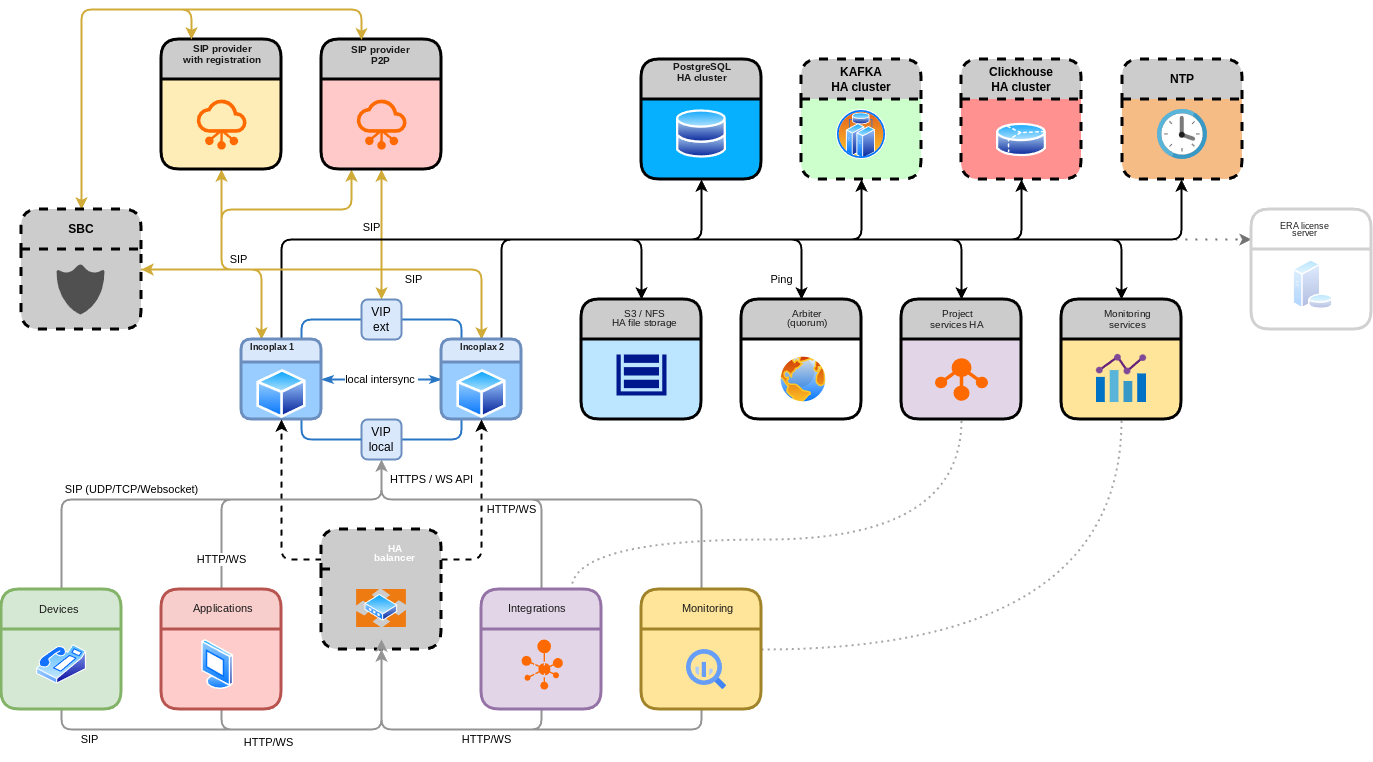
Note: the platform is only part of the system. The external database cluster provides quorum and reliable administrable replication. S3 storage guarantees file availability regardless of server state. The arbiter prevents split-brain.
The balancer is shown here as optional. If your clients and providers can work with several addresses directly — the balancer is not needed. This removes another component that must be reserved and administered. A balancer makes sense when the internal structure must be hidden, a specified distribution of connections across nodes ensured, or clients do not support multi-homing while neither Virtual IP nor Multi DNS is used.
| Monitoring tools must be configured and indicators tracked. It is definitely better to prevent a negative situation than to deal with its consequences. |
| The platform allows starting with one server and then extending the configuration without migrating accumulated data. |
Key message: fault tolerance is not a button but an architecture. The Incoplax platform provides tools, but success depends on competent design of the whole supersystem.
Alternative approach: Active-Passive with geo-distribution
By the way, two servers can solve the redundancy task in a completely different way — not as equal Active-Active nodes but in Primary-Secondary mode.
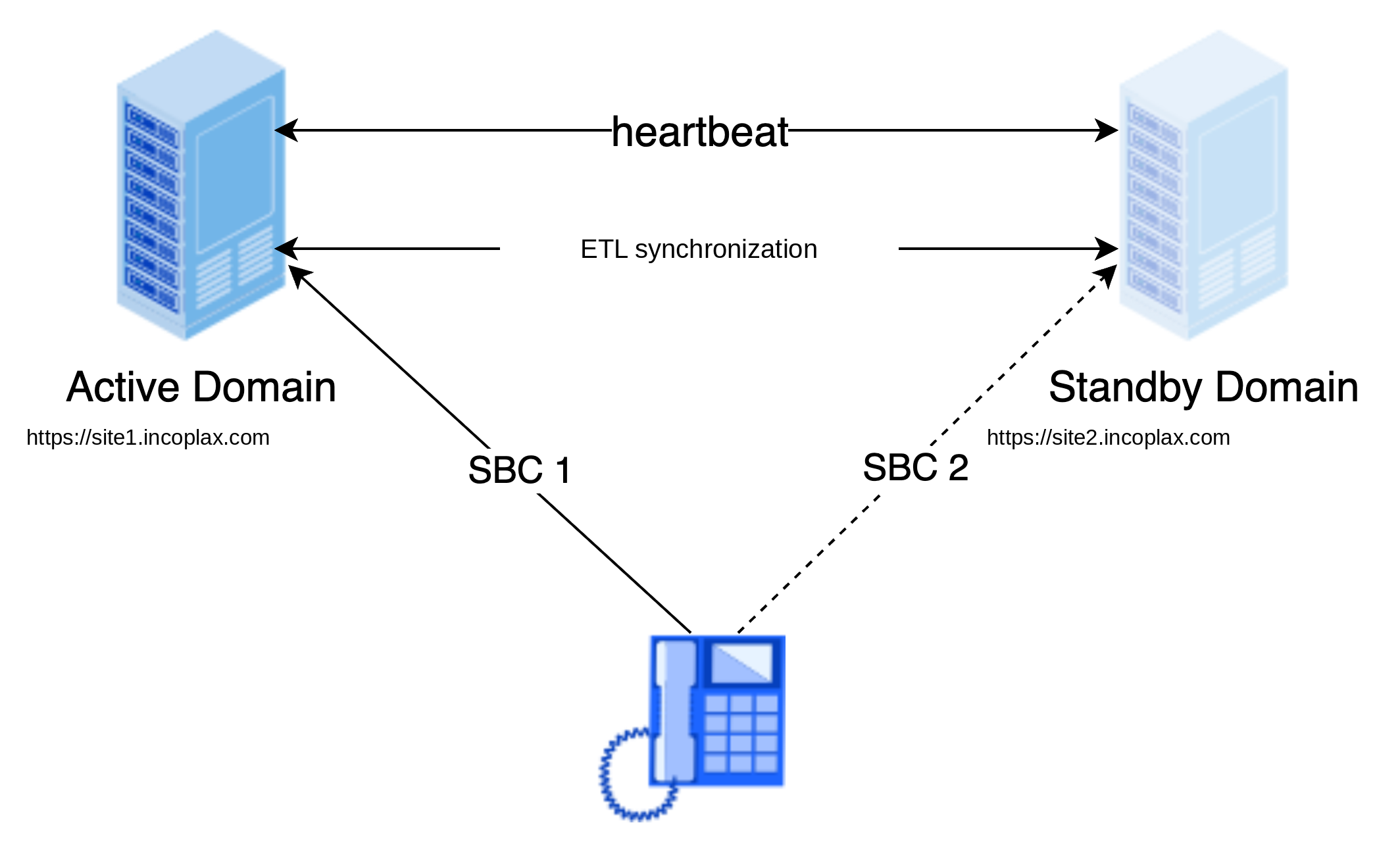
How it works
-
Primary (predominantly active) — processes all load and collects historical data.
-
Secondary (predominantly passive) — is in standby mode, may be geographically separated.
-
Settings replication — domain settings are replicated in real time from active to passive.
-
Historical data — collected on Primary; Secondary sends its local data to Primary after connectivity recovery and its activation.
Passive system behavior
-
Disables services that change data.
-
Sets redirection on facades: regular users automatically go to Primary, only the administrator can connect directly for servicing.
-
If it does not sense Primary for 30 seconds — it activates and starts servicing calls.
On Primary recovery
-
Does not take activity automatically.
-
Works in passive mode for some time.
-
Activity transfer back occurs when the active one is unavailable or by administrator signal in a suitable maintenance window.
Approach specifics
| Feature | What it means |
|---|---|
⚠️ Real-time processes are not transferred |
Active calls break on switching — this is the compromise for simplicity and activation speed |
✅ Minimal activation time |
The passive system is partially loaded, "warmed up", and ready to work |
✅ Configuration settings, external connections |
Individual and independent |
Low coupling of the two systems. |
✅ No realtime or infrastructure. Only target business data of long-term storage and use is transferred, with fine filter configuration. |
✅ Current domain settings in real time |
Accounts, rules, scripts, queues — everything necessary — are constantly synchronized from active to passive |
✅ Single source of historical data |
All archives are collected on Primary — simpler analytics and reporting |
✅ Compatibility with distributed storages |
Both systems can write to a single Kafka+ClickHouse infrastructure |
✅ Predictable load |
Only one system is loaded — simpler resource planning |
✅ Testing without risk |
Secondary readiness can be checked at any moment |
✅ Independent servicing and updating |
While Primary is serviced or updated, Secondary does the work. Version difference is not a problem. |
✅ Domain boundaries |
The mode applies to redundancy not of the whole system but of a specific domain. |
When this approach is justified
-
Geo-redundancy is required (servers in different data centers/cities).
-
There is no High Available infrastructure, but there are two independent sites.
-
Loss of active sessions on switching is acceptable.
-
Ability to test standby node readiness is needed, including without affecting production.
-
Simplified administration model: one system is active, the second is "on standby". ETL instead of UnSplit-Brain.
|
Conclusion: Active-Passive is not a "simplified" version of the two-server configuration but a conscious architectural choice with its own compromises. It may be preferable to Active-Active when geo-resilience and management simplicity matter more than the ability to preserve active sessions. |