4. Archives
Archives allow taking a folder or an entire section as one file and returning them back together with nested folders. This exists only in tree sections.
Download as archive

Download section as archive at the root and Download as archive inside a folder. The archive is assembled on the server, so a large folder is not delivered instantly: the application reports that the archive is being prepared and gives the file to the browser when it is assembled.
The archive name is composed of the section name and folder path: cacerts.zip for
a section, files-certificates.zip for a folder inside it, siteshare-public.zip
for a part of a composite section.
A folder or an entire section can be taken whole while the files in them are fewer than 10,000 and the volume is less than 2,000,000,000 bytes — about 1.9 GB. The application learns the volume in advance and says immediately if there is nothing to take: no need to wait for assembly and receive a refusal. A folder that is too large is taken in parts — by nested folders.
There is nothing to archive in an empty folder, and this will be stated.
Upload as archive
Upload as archive… in the same menu. The structure is preserved: the entry sub/report.pdf
goes into the sub subdirectory, not next to it.
The archive goes through the same queue as regular files, but as one row: it is accepted or rejected as a whole, and what exactly was in it is visible from the folder content after unpacking.
There are three limits, and the application states each in words:
-
the archive file itself — less than 2,000,000,000 bytes: exactly that or more is not accepted in one request. The application says this before sending, and if the server refuses, it names the limit it applied;
-
unpacked — up to 2,000,000,000 bytes, and this is the main number: it cannot be guessed from the archive size. Text compresses several times, binary data hardly compresses at all, so a 300 MB archive can unpack to a gigabyte or to twenty megabytes. The unpacked volume is visible to the server from the archive table of contents — before anything is written to disk;
-
an individual file inside the archive — up to 536,870,912 bytes (512 MB). This is the platform-wide limit per file; a section may have its own, and then regular upload is limited by it.
The packing limit and the unpacked volume limit coincide intentionally: a folder that could be downloaded as an archive can always be uploaded back.
When an archive will be rejected
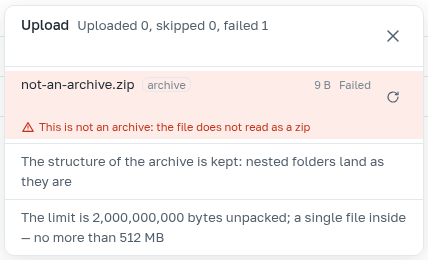
Half an archive is never unpacked: if something is wrong, the whole archive is rejected. Reasons:
-
the file is not an archive;
-
the archive file itself is 2,000,000,000 bytes or more;
-
unpacked, the archive is larger than 2,000,000,000 bytes;
-
inside there is a file larger than 536,870,912 bytes;
-
inside there is a path escaping the archive (
.., an absolute path, a link outside); -
inside there is a name invalid under the suffix rule ("Files" section) — for example
report!metadata.
The application names the reason itself, and for the entry that caused the archive to be rejected it shows its name: that is what must be fixed.